library(tidyverse)
library(readxl)

path = "files/Ex-Challenge 03 2025.xlsx"
input = read_excel(path, range = "B3:H12")
test  = read_excel(path, range = "J3:L18") %>% arrange(Shop, desc(Sale))

result =
  bind_rows(
    input %>% select(1, 2, 3),  # First set of Fruit and Sale
    input %>% select(1, 4, 5),  # Second set of Fruit and Sale
    input %>% select(1, 6, 7)   # Third set of Fruit and Sale
  ) %>%
  mutate(Fruit = as.factor(Fruit)) %>%
  summarise(Sale = sum(Sale), .by = c(Shop, Fruit)) %>%
  complete(Shop, Fruit, fill = list(Sale = 0)) %>%
  mutate(Fruit = as.character(Fruit)) %>%
  arrange(Shop, desc(Sale))

all.equal(result, test, check.attributes = FALSE)
# [1] TRUECrispo - Excel Challenge 03 2025
excel-challenges
weekly-exercises
Easy Sunday Excel Challenge
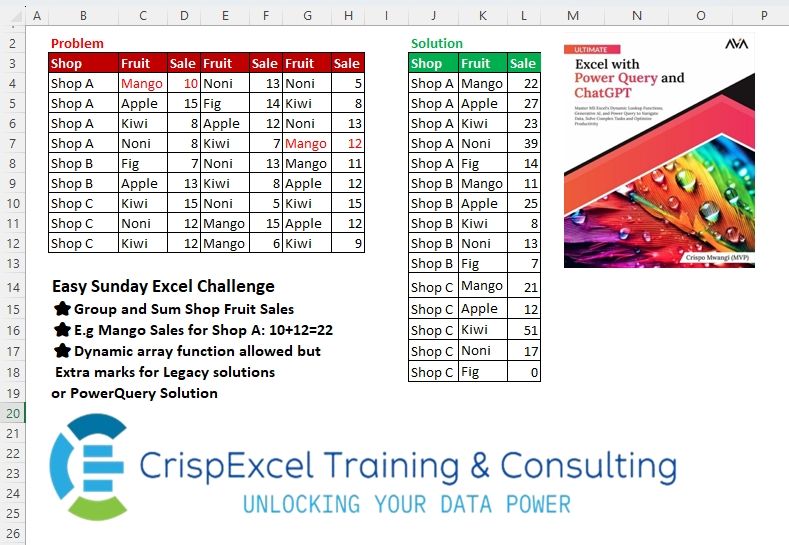
Challenge Description
Easy Sunday Excel Challenge
⭐Group and Sum Shop Fruit Sales
⭐ e.g. Mango Sales for Shop A: 10+12=22
Solutions
Logic:
pivot_longer: Converts wide data to long format by separating column names into base names and numeric identifiers.unite: Concatenates selected columns (Age,Nationality,Salary) into a single string column.na.omit: Removes rows with missing values.
Strengths:
Compact Transformation: The use of
pivot_longerandunitesimplifies reshaping and formatting.Readability: Tidyverse functions make the process easy to follow.
Areas for Improvement:
- Dynamic Column Handling: Ensure the solution dynamically adapts to column name variations or additional fields.
Gem:
- The regex
(.*)(\\d+)effectively extracts base column names and their associated numbers.
- The regex
import pandas as pd

path = "files/Ex-Challenge 03 2025.xlsx"
input = pd.read_excel(path, usecols="B:H", skiprows=2, nrows=9, names=['Shop', 'Fruit.1', 'Sale.1', 'Fruit.2', 'Sale.2', 'Fruit.3', 'Sale.3'])
test = pd.read_excel(path, usecols="J:L", skiprows=2, nrows=15)

# Stack the repeating fruit-sale columns into a long format
result = pd.concat([input.iloc[:, [0, i, i+1]] for i in range(1, 6, 2)]).reset_index(drop=True)

# Dynamically adjust column names
result['Fruit'] = result[['Fruit.1', 'Fruit.2', 'Fruit.3']].bfill(axis=1).iloc[:, 0]
result['Sale'] = result[['Sale.1', 'Sale.2', 'Sale.3']].bfill(axis=1).iloc[:, 0]
result = result[['Shop', 'Fruit', 'Sale']]

# Group by Shop and Fruit, then sum sales
summary = result.groupby(['Shop', 'Fruit'], as_index=False)['Sale'].sum()

# Ensure all combinations are represented and sorted
summary = summary.pivot(index='Shop', columns='Fruit', values='Sale').fillna(0).reset_index()
summary = summary.melt(id_vars='Shop', var_name='Fruit', value_name='Sale')
summary['Sale'] = summary['Sale'].astype(int)
summary = summary.sort_values(['Shop', 'Sale'], ascending=[True, False]).reset_index(drop=True)

# Compare with test data
test.columns = summary.columns
test = test.sort_values(['Shop', 'Sale'], ascending=[True, False]).reset_index(drop=True)

print(all(summary == test)) # TrueLogic:
pd.melt: Converts wide data to long format for easier manipulation.str.extract: Splits column names into base names (Name) and numeric identifiers (Number).pivot_table: Reshapes the data into a grouped format.Column concatenation: Combines multiple fields into a single formatted column.
Strengths:
Modularity: Each transformation step is clearly defined and reusable.
Flexibility: Handles data aggregation and formatting dynamically.
Areas for Improvement:
- Error Handling: Ensure robust handling of unexpected data types or missing columns.
Gem:
- The use of
str.extractfor splitting column names based on a regex is concise and adaptable.
- The use of
Difficulty Level
This task is moderate:
Requires reshaping and aggregating data, both of which are common but non-trivial transformations.
Demands familiarity with regex for parsing column names.